Skip to content

What Is Google Verified? Benefits, Requirements & Process

Understanding Google’s Verification Programs
If you’ve searched for a local business online, you’ve probably noticed terms like “Google Verified,” “Google Guaranteed,” or verification badges appearing in search results.
The problem is that these labels aren’t always explained clearly, leaving many business owners and customers wondering what they mean and whether they actually matter.
Understanding what “Google Verified” means is important because verification can influence how customers perceive your business online. For many local businesses, a verified profile helps establish credibility before a customer ever makes contact. After all, earning trust online is a lot easier than convincing someone you’re real through a blurry logo and a profile last updated three years ago.
Knowing these distinctions can help you manage your online presence more effectively and avoid common verification mistakes, so let’s take a closer look at how Google verification works.
Table of Contents
- What Is Google Verified?
- What Is a Google Verified Listing?
- Do I Need to Verify My Business With Google?
- How to Verify Your Business With Google
- What Google Checks Before Verifying a Business
- Common Reasons Google Verification Gets Rejected
- Maintaining Your Google Verified Status
- The Different Types of Google Verification Explained
- Google Verified vs Google Guaranteed vs Google Screened
- What Google Verified Means for Cleaning Businesses
- Common Misconceptions About Google Verified
What is Google Verified?
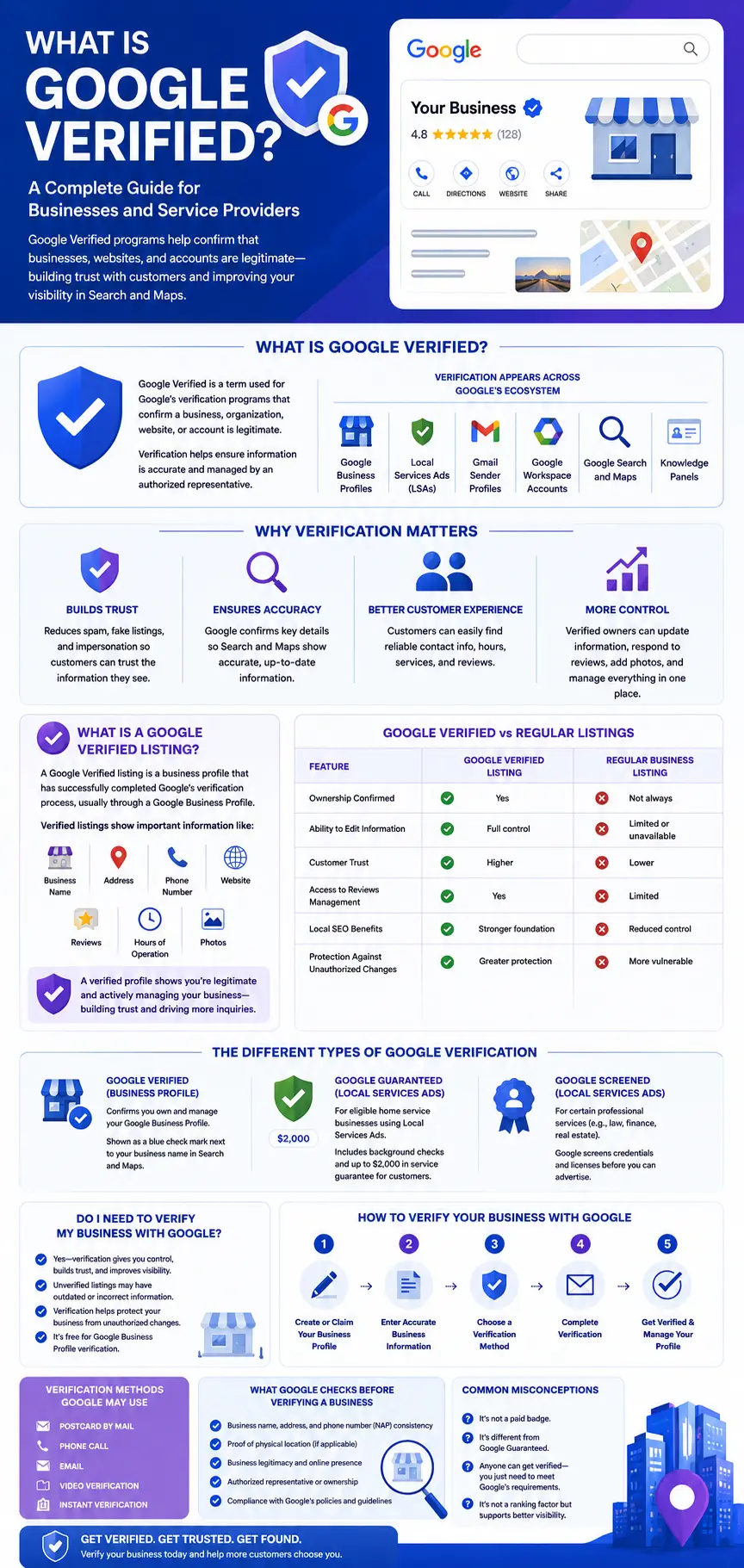
Google Verified is a term used for Google’s various verification programs that confirm a business, organization, website, or account is legitimate. These programs help ensure that business information is accurate and managed by an authorized representative.
Depending on the platform, verification may involve confirming business ownership, verifying a physical location, validating a domain name, or reviewing professional credentials.
Google verification appears in several places across Google’s ecosystem, including:
- Google Business Profiles
- Local Services Ads (LSAs)
- Gmail sender profiles
- Google Workspace accounts
- Knowledge Panels
- Google Search and Maps
The appearance of the badge or verification indicator varies depending on the platform.
Where You May See Google Verified
Google verification can appear in several places across Google’s ecosystem, depending on the type of business, account, or service being verified.
For local businesses, verification is most commonly associated with Google Business Profiles, where verified businesses can manage the information displayed in Google Search and Google Maps. Customers may encounter verified business information when viewing business listings, map results, or local search results.
Verification indicators may also appear in Local Services Ads, where eligible service providers can earn trust badges after completing Google’s screening and verification requirements. In other cases, verification may apply to Gmail sender profiles, Google Workspace domains, or Knowledge Panels associated with public figures, brands, and organizations.
The appearance of a verification badge or indicator varies depending on the platform. Some programs display a badge, checkmark, or verification label, while others simply grant businesses access to management features and ownership controls. Regardless of the format, Google’s goal is the same: to help users identify legitimate businesses and ensure that important information is accurate and managed by authorized representatives.
What Google Verification Does Not Mean
While verification helps confirm that a business, organization, or account is legitimate, it is not an endorsement from Google.
A verified business is not automatically the best business in its industry, nor does verification guarantee customer satisfaction, service quality, or higher search rankings. Verification simply indicates that Google has confirmed certain information and that the profile is managed by an authorized representative.
Google still evaluates many other factors when determining local search visibility, including relevance, proximity, website quality, customer reviews, and overall reputation. Likewise, customers should view verification as a trust signal rather than a guarantee of performance.
In short, verification helps establish authenticity, but it should not be confused with a recommendation or certification of quality.
Why Google Uses Verification for Businesses
Google wants users to find trustworthy businesses and accurate information when they search online.
Verification helps reduce spam, fake listings, impersonation attempts, misleading business profiles, and other forms of fraudulent activity that can create a poor experience for users.
By verifying businesses, Google can have greater confidence that the information displayed in Search and Maps is accurate and managed by an authorized representative. This helps customers make informed decisions and connect with legitimate businesses more easily.
For business owners, verification helps ensure that customers see accurate information when searching online. It also provides access to profile management features, allowing businesses to update contact details, operating hours, services, photos, and customer-facing information from a single dashboard.
What Is a Google Verified Listing?
A Google Verified listing is a business profile that has successfully completed Google’s verification process. This typically applies to a Google Business Profile, formerly known as Google My Business.
When a verified business appears in Google Search or Google Maps, users can see information such as:
- Business name
- Address
- Phone number
- Website
- Reviews
- Hours of operation
- Photos
Verification confirms that the business owner has control over the listing and that the information has been validated by Google.
Why Verified Listings Build Trust With Customers
Consumers often compare several businesses before making a decision, especially when searching for local services online.
A verified listing signals that the business owner has claimed and manages the profile. Customers are more likely to find current information, updated hours, recent photos, and active responses to reviews. Because Google has confirmed key business details, users are more likely to trust the information they see in search results and on Google Maps.
A verified profile also provides accurate contact information, business hours, service details, and other important updates, reducing frustration for customers trying to reach a business.
When people can quickly find reliable information and feel confident that a business is genuine, they are often more willing to call, request a quote, or visit the location. Over time, this added trust can lead to more customer inquiries and stronger engagement with the business.
Google Verified Listings vs Regular Business Listings
| Feature | Google Verified Listing | Regular Business Listing |
|---|---|---|
| Ownership Confirmed | Yes | Not always |
| Ability to Edit Information | Full control by verified owner | Limited or unavailable |
| Customer Trust | Higher trust signals | Lower trust confidence |
| Reviews Management | Full access to manage reviews | Limited management options |
| Local SEO Benefits | Stronger foundation for local visibility | Reduced control over optimization |
| Protection Against Unauthorized Changes | Greater protection and ownership control | More vulnerable to inaccurate changes |
Note: Google verification requirements and listing management features may change over time. Always confirm current verification requirements directly through Google Business Profile.
A regular business listing may appear in Google Search or Google Maps even if the owner has never claimed or managed it. In many cases, these listings are automatically generated from information Google finds across the web. While they can still provide basic details about a business, the information may be incomplete, outdated, or inaccurate.
A verified listing, on the other hand, confirms that the business owner or an authorized representative has claimed the profile and completed Google’s verification process. This gives the business direct control over the information customers see when searching online.
A verified listing allows owners to:
- Update business information
- Respond to reviews
- Add photos and services
- Monitor customer interactions
- Improve local search visibility
- Post updates, promotions, and announcements
- Answer customer questions and provide additional details
Verified businesses have more control over how they appear online, making it easier to maintain accurate information and present a professional image.
Do I Need to Verify My Business With Google?
For most businesses, the answer is yes.
Verifying your business with Google helps ensure that customers can find accurate information and interact with an officially managed profile.
Verification is not simply a technical requirement. It allows you to manage your business profile, keep information accurate, respond to reviews, and reduce the likelihood of incorrect information appearing in search results.
Benefits of Becoming Google Verified
Becoming Google Verified offers practical benefits beyond displaying a verification badge.
It helps businesses manage profile information, communicate with customers, protect listings from unauthorized changes, and maintain a stronger presence across Google Search and Maps.
Increased Customer Trust
Customers are more likely to engage with businesses they believe are legitimate and trustworthy. Verification signals that Google has confirmed your business information, helping potential customers feel more confident when choosing your services.
Improved Local Visibility
A verified business profile allows you to fully participate in Google’s local search ecosystem. This can improve your chances of appearing in Google Maps, local search results, and other prominent locations where customers look for nearby businesses.
Better Business Credibility
Verification adds an extra layer of professionalism to your online presence. When customers see that your business has been verified, they are often more likely to view your company as established, reliable, and committed to maintaining accurate information.
More Qualified Leads
Verified profiles provide customers with accurate details about your business, making it easier for interested prospects to contact you. As a result, you may receive more inquiries from people who are actively searching for the services you offer.
Protection Against Impersonation and Fraud
Verification helps secure your business profile by confirming ownership and management rights. This reduces the risk of unauthorized individuals claiming your listing, making changes to your information, or attempting to misrepresent your business online.
Risks of Leaving Your Business Unverified
Some business owners assume that because their company already appears in Google Search, verification is unnecessary.
However, leaving a profile unverified can create several challenges.
- Customers may see outdated information such as incorrect hours, phone numbers, or addresses.
- An incomplete profile can reduce trust and make your business appear less credible.
- Competitors with verified profiles may gain more visibility in local search results.
- You may have limited control over updates, reviews, and business information.
- Unverified listings are more vulnerable to errors, duplicate profiles, and ownership issues.
Verifying your business helps keep information accurate, protects your online presence, and builds customer confidence.
Businesses That Benefit Most From Verification
Although verification is beneficial for nearly every organization, some industries gain particularly significant advantages because customers rely heavily on local search when making purchasing decisions.
This includes:
- Home service businesses such as cleaning companies, plumbers, electricians, and HVAC contractors
- Medical and healthcare providers
- Law firms and attorneys
- Restaurants and hospitality businesses
- Retail stores
- Professional service providers such as accountants, consultants, and real estate professionals
For these businesses, verification helps build trust, maintain accurate information, and improve visibility with local customers.
If your business serves customers in a specific geographic area, verification is an important part of managing your online presence and supporting local marketing efforts.
How to Verify Your Business With Google
Verifying your business with Google is a straightforward process, but the exact steps may vary depending on your business type and the verification methods available to you. If you’re ready to verify your business, Google provides official instructions and requirements for completing the process.
Before you begin, make sure you have accurate business information and any required documentation ready. The following steps will help guide you through the verification process.
Step 1: Create or Claim Your Google Business Profile
Visit Google’s Business Profile platform and either create a new listing or claim an existing one.
Make sure the information matches your official business records.
Step 2: Complete Your Business Information
Fill out your business profile with accurate and up-to-date information, including:
- Business name
- Address
- Phone number
- Website
- Service areas
- Operating hours
Make sure all details are consistent across your website, social media profiles, and online directories. Consistency helps Google verify your business more efficiently and improves customer trust.
Step 3: Choose a Verification Method
After submitting your business information, Google will offer one or more verification methods based on your business category, location, and eligibility. Common options include video verification, phone verification, email verification, live video calls, or, in some cases, postcard verification.
Select the method that is available to you and follow Google’s instructions carefully.
Step 4: Complete the Verification Process
Depending on the verification method, you may need to submit supporting materials such as business documentation, photos, videos, or proof that you operate from the listed location.
Make sure all information is accurate and clearly demonstrates that you own or manage the business. Incomplete or inconsistent submissions can delay approval.
Verification Methods Google May Use
Google offers several verification methods depending on your business type, location, and risk profile.
Not every business will have access to the same options, but the goal is always the same: to confirm that your business is legitimate and that you are authorized to manage the profile.
- Video Verification: Google may ask you to record a video showing evidence that your business is legitimate and actively operating. This could include business signage, company vehicles, branded equipment, inventory, office space, employee work areas, or proof that you have access to the location listed in your profile. Service-area businesses, such as cleaning companies, often encounter video verification because they may not operate from a traditional storefront.
- Phone Verification: Google may send a verification code through an automated phone call or text message to the business phone number on file.
- Email Verification: Some businesses can verify ownership by receiving and entering a code sent to their business email address.
- Live Video Call Verification: In certain cases, Google may require a live video call with a representative who will review your location, equipment, or business documentation in real time.
- Postcard Verification: When available, Google may mail a verification code to your business address. Although still used in some situations, this method is less common than it once was.
Which Verification Method Will Google Choose?
Google determines verification methods based on factors such as your business category, location, online presence, and perceived risk level. As a result, two businesses in the same industry may receive different verification options.
For example:
- A retail store with clear signage, an established website, and a long online history may qualify for phone or email verification.
- A cleaning company that serves customers at their homes rather than operating from a public storefront may be asked to complete video verification to demonstrate that the business is actively operating.
- A newly created business profile with limited online presence may require a live video call or additional documentation before approval.
- Businesses operating from a physical location may still receive postcard verification in some situations, although this method is less common than in previous years.
The verification options available to your business are determined by Google and cannot typically be selected manually. If Google requests a specific verification method, completing the process exactly as instructed usually provides the fastest path to approval.
What Google Checks Before Verifying a Business
Before granting verification, Google evaluates several factors to confirm that a business is real, accurately represented, and operated by an authorized owner.
Business Ownership
Google confirms that the individual requesting verification is authorized to represent and manage the business. This may involve reviewing:
- ownership records
- operational evidence
- other documentation that demonstrates a legitimate connection to the company
Physical Location
Google verifies that the business operates from a real, eligible location that complies with its guidelines. Depending on the business model, owners may need to provide evidence such as signage, workspace access, or proof of occupancy.
Service-area businesses that travel to customers rather than serving them at a storefront are subject to separate verification requirements.
Business Legitimacy
Google evaluates multiple signals to confirm that a business is genuine, actively operating, and accurately represented online. This can include reviewing business information, online presence, supporting documentation, and operational details.
Licenses and Insurance Requirements for Certain Industries
For regulated or high-trust industries, including cleaning, plumbing, electrical services, legal services, and similar professions, Google may require proof of licensing, insurance, certifications, or other credentials.
These requirements help ensure compliance with industry standards, protect consumers, and maintain the integrity of Google’s business verification programs.
Common Reasons Google Verification Gets Rejected
If your verification request gets rejected, don’t panic. Most issues are fairly common and can be fixed. In many cases, Google simply needs clearer information before it can confidently verify your business.
Inconsistent Business Information
Imagine your website lists one phone number, your Facebook page shows another, and your Google Business Profile uses a slightly different business name. To Google, those inconsistencies can be a red flag.
To avoid problems, make sure your business name, address, phone number, and website are consistent everywhere your business appears online. Even small differences can slow down or prevent verification.
Invalid Addresses
Your business address plays a major role in the verification process. Google wants to verify that your business operates from a real, eligible location.
Using a PO box, a virtual office, or an address that doesn’t meet Google’s guidelines can lead to rejection. Before submitting your profile, double-check that your address accurately reflects where your business operates and complies with Google’s requirements.
Missing Documentation
Sometimes Google asks for additional proof that your business exists. This may include photos, videos, licenses, utility bills, or other ownership documents.
If the information provided is incomplete, blurry, outdated, or missing altogether, verification may be delayed or denied. Taking a few extra minutes to submit clear and accurate documentation can save a lot of frustration later.
Policy Violations
Google has strict guidelines for business listings, and violating them can create verification issues.
Common mistakes include adding extra keywords to your business name, creating misleading listings, selecting inaccurate business categories, or misrepresenting services. Even if the violation seems minor, it can trigger additional reviews and slow down the approval process.
Duplicate Business Profiles
Another common issue is having more than one Google Business Profile for the same business location.
Duplicate listings can confuse both Google and potential customers. Google may suspend one profile, merge the listings, or delay verification until the issue is resolved. Keeping a single, accurate profile is usually the safest and most effective approach.
Maintaining Your Google Verified Status
Verification is not always a one-time process. Although many businesses remain verified for years without issues, Google may request re-verification if significant changes occur or if the platform needs additional confirmation that your business information remains accurate.
Changes That May Trigger Re-Verification
Google may require businesses to verify their profiles again after certain updates, including:
- Changing your business address
- Updating ownership or management information
- Making significant edits to your business name
- Changing business categories
- Expanding or modifying service areas
- Updating contact information in ways that create inconsistencies
Not every change will trigger re-verification, but substantial profile updates often receive additional review.
Keep Your Business Information Accurate
One of the best ways to maintain verified status is to keep your information current and consistent across all online platforms.
Make sure your:
- Business name
- Address
- Phone number
- Website
- Operating hours
match the information displayed on your website, social media accounts, and business directories whenever possible.
Consistency helps Google maintain confidence in your business information and can reduce verification issues in the future.
Follow Google’s Business Profile Guidelines
Google requires businesses to comply with its Google Business Profile guidelines at all times.
Common violations that may lead to profile restrictions, suspensions, or additional verification requests include:
- Using misleading business names
- Keyword stuffing your profile name
- Creating duplicate listings
- Listing ineligible locations
- Misrepresenting products or services
Following Google’s guidelines helps protect your profile and maintain uninterrupted access to your business listing.
Monitor Your Profile Regularly
Even after verification, it is important to periodically review your profile for accuracy. The Google Business Profile Help Center provides guidance on managing profile updates, resolving issues, and maintaining accurate business information.
Regular monitoring allows you to:
- Update business information
- Respond to customer reviews
- Add new photos
- Correct inaccurate edits
- Address potential issues before they affect customers
An actively managed profile helps maintain a professional presence and ensures customers continue to see accurate information when searching for your business.
The Different Types of Google Verification Explained
Google offers several verification programs across its platforms, each designed to confirm legitimacy, improve trust, and serve a specific purpose for businesses, organizations, and users.
Google Verified Badge for Local Services Ads (LSAs)
Local Services Ads are designed for service-based businesses such as cleaning companies, plumbers, electricians, HVAC contractors, landscapers, and other businesses that serve customers within a specific geographic area.
To become Google Verified through Local Services Ads, businesses must complete Google’s screening and verification process. Depending on the industry and location, this may include business registration reviews, identity verification, license checks, insurance verification, and background screening requirements.
When customers see a Google Verified badge on a Local Services Ad, it indicates that the business has met Google’s eligibility requirements for participation in the program. This trust signal can help customers feel more confident when contacting service providers directly from search results.
For many home service businesses, Local Services verification is separate from standard Google Business Profile verification and may involve additional requirements. Businesses can review Google’s Local Services Ads Help Center for eligibility details and program requirements.
Google Business Profile Verification
Google Business Profile verification is the most common type of Google verification for local businesses.
This process confirms that a business operates from a legitimate location or service area and that the person managing the profile is authorized to represent the business. Verification may be completed through video verification, phone verification, email verification, live video calls, or other methods selected by Google.
Once verified, business owners gain access to profile management tools that allow them to update business information, respond to reviews, upload photos, post updates, and monitor customer interactions.
Customers may not always see a prominent verification badge, but verification enables businesses to manage the information displayed in Google Search and Google Maps, helping ensure that customers receive accurate and up-to-date information.
Gmail Verified Blue Checkmark
The Gmail blue checkmark is designed to help users identify legitimate email senders and reduce the risk of phishing attacks or email impersonation.
To qualify, organizations typically implement email authentication standards and complete brand verification requirements that help Google confirm ownership of the sending domain. Google’s Gmail sender verification requirements outline the technical and branding standards needed for eligibility.
Once approved, eligible senders may display a blue verification checkmark next to their email messages within Gmail.
For businesses that rely heavily on email marketing, customer communication, or brand recognition, this verification can help improve trust and reassure recipients that messages are coming from a legitimate source.
Google Workspace Domain Verification
Organizations that use Google Workspace must verify ownership of their website domain before activating many of Google’s business tools and services.
Domain verification typically involves adding a verification record to the website’s DNS settings, allowing Google to confirm that the organization controls the domain associated with its email accounts and business operations.
This verification protects organizations from unauthorized use of their domain and helps ensure that Google Workspace services are only accessible to legitimate owners and administrators.
Knowledge Panel Verification
Knowledge Panel verification is available to eligible public figures, brands, organizations, and entities that appear in Google’s Knowledge Graph.
Verification allows authorized representatives to claim the panel and gain limited management capabilities. While it does not provide complete control over all displayed information, it enables verified representatives to suggest updates, report inaccuracies, and provide additional information to Google.
This verification helps ensure that important public information remains accurate and gives organizations a more direct role in maintaining their online presence within Google Search results.
Google Verified vs Google Guaranteed vs Google Screened
Many business owners confuse these programs because they all involve trust signals from Google.
Key Differences Between Each Badge
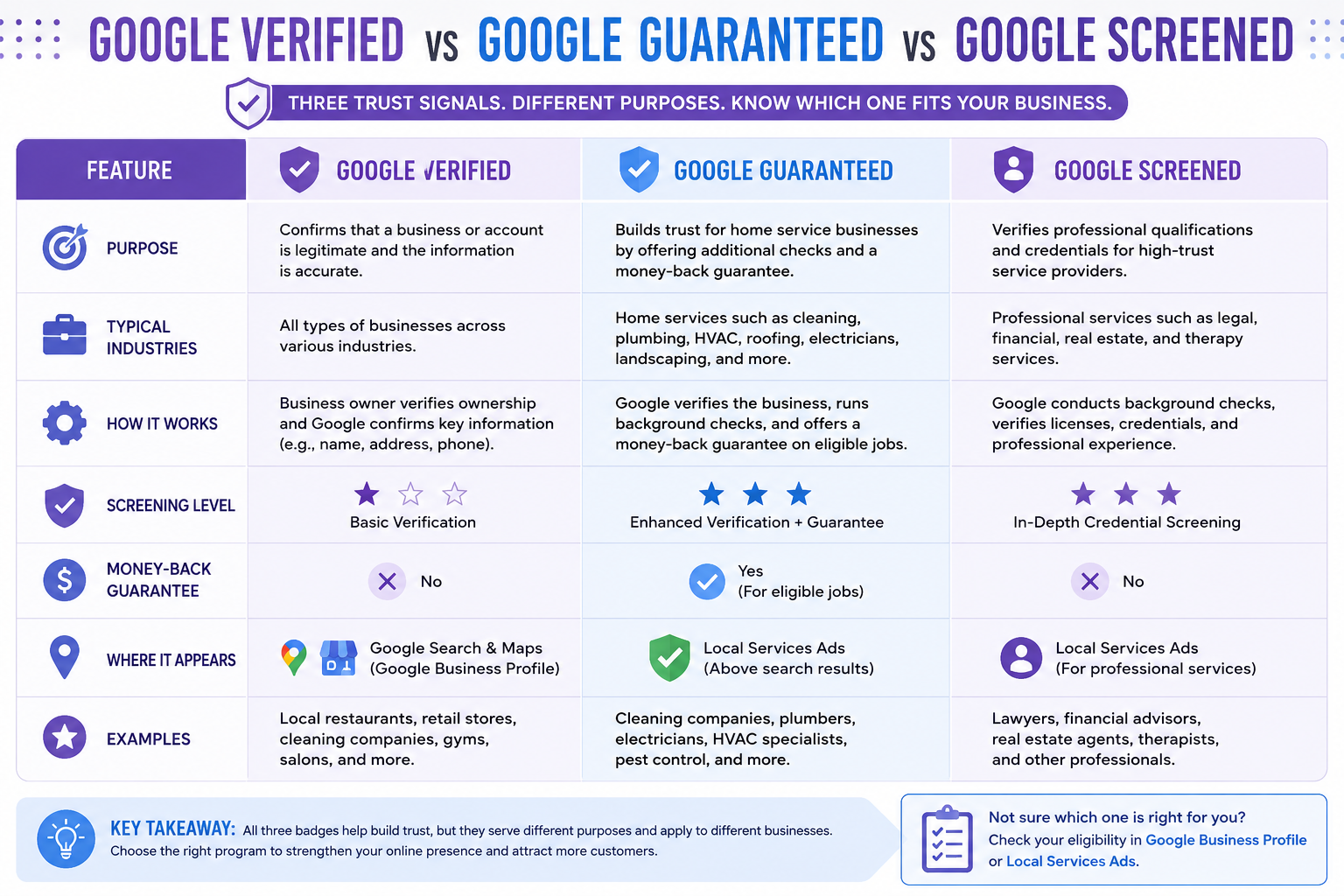
While Google Verified, Google Guaranteed, and Google Screened all serve as trust signals, they are not interchangeable programs.
Each badge is designed for a different purpose and applies to different types of businesses. Some programs simply verify business ownership and legitimacy, while others involve more extensive screening processes that may include background checks, license verification, insurance reviews, or credential validation.
Understanding these differences can help business owners determine which programs apply to their industry and help consumers better interpret the trust signals they encounter in Google Search.
Google Verified
- Confirms that a business has completed Google’s verification process
- Helps demonstrate that the business is legitimate and managed by an authorized representative
- Commonly associated with verified business profiles and certain Google services
Google Guaranteed
- Previously focused on eligible home service businesses
- Businesses participating in the Google Guaranteed program may qualify for customer protection benefits in some markets.
- Often required additional screening, such as license and insurance verification, depending on the industry
Google Screened
- Applied to certain professional service industries
- Included credential reviews and screening requirements
- Commonly used for professions such as lawyers, financial planners, and real estate professionals in eligible markets
| Feature | Google Verified | Google Guaranteed | Google Screened |
|---|---|---|---|
| Purpose | Standard business verification | Home services trust program with additional screening | Professional service credential verification |
| Industries | Various business categories | Home service businesses | Professional service providers |
| Additional Screening | Sometimes required | Yes | Yes |
Note: Google may update eligibility requirements, screening processes, and program availability depending on business category, location, and current platform policies. Always confirm current requirements directly through Google's official documentation.
Which Verification Program Applies to Your Business?
The verification program that applies to your business depends largely on your industry, location, and whether you participate in certain Google advertising products.
For most local businesses, Google Business Profile verification is the starting point. Restaurants, retail stores, medical practices, cleaning companies, contractors, and professional service providers typically verify their Google Business Profile to manage how their business appears in Google Search and Google Maps.
Businesses that advertise through Local Services Ads may be eligible for additional verification programs. Home service providers such as plumbers, electricians, HVAC contractors, locksmiths, landscapers, and cleaning companies may qualify for Google Verified or Google Guaranteed programs, depending on Google’s requirements in their market.
Professional service providers, including attorneys, financial advisors, real estate professionals, and similar industries, may encounter Google Screened, which often involves credential reviews and additional verification requirements.
Because eligibility varies by country, industry, and Google’s current policies, businesses should review Google’s requirements to determine which trust programs are available to them.
What These Badges Mean to Customers
From a customer’s perspective, these badges are designed to provide additional confidence when choosing a business online.
A Google Verified business has completed Google’s verification process, confirming that the business is legitimate and managed by an authorized representative.
A Google Guaranteed business has typically undergone additional screening requirements associated with Google’s Local Services Ads program. Depending on the market and industry, this may include license verification, insurance reviews, and background checks.
A Google Screened business has completed screening requirements related to professional qualifications or credentials within eligible industries.
While these badges can increase trust, customers should still evaluate reviews, experience, reputation, pricing, and service quality before making a hiring decision. The badges are trust signals, not guarantees that one business is better than another.
What Google Verified Means for Cleaning Businesses
Verification can be particularly valuable for cleaning businesses because customers often compare multiple providers before making a decision. Companies such as Roochii Cleaning can use verification to help customers confirm that business information is accurate and actively managed.
A verified profile makes it easier for customers to find accurate information and contact your business. It also helps demonstrate that your company is actively operating.
Building Trust With Homeowners and Commercial Clients
When hiring a cleaning company, customers want reassurance that they’re dealing with a real, professional business. A verified Google profile helps provide that confidence before a prospect ever visits your website or calls for a quote.
A strong verified presence becomes even more effective when paired with:
- Positive customer reviews
- Up-to-date business information
- Professional photos
- Prompt responses to customer questions and feedback
For both homeowners and commercial clients, these trust signals can help your business stand out from the competition.
How a Verified Presence Can Increase Leads and Bookings
Many customers compare several cleaning companies before making a decision. A verified profile helps our Denver cleaning team appear more credible to customers who are comparing multiple service providers online.
Benefits may include:
- More profile views in local search results
- Increased phone calls and website visits
- Higher confidence when requesting estimates
- More inquiries from customers actively looking for cleaning services
When combined with excellent service and positive reviews, verification can help turn online searches into real bookings and long-term customers.
Common Misconceptions About Google Verified
One of the biggest mistakes business owners make is assuming that Google verification works like a marketing shortcut. In reality, verification is a trust signal, not a growth strategy by itself.
“Google Verified Will Get Me to the Top of Search Results”
Verification is important, but it is not a ranking guarantee.
Google still evaluates factors such as:
- Relevance to the search query
- Business reputation and reviews
- Location and proximity
- Website quality and local SEO signals
Think of verification as the foundation of your online presence. It helps Google trust your business, but it doesn’t replace the work required to earn visibility.
“I Need to Pay Google to Become Verified”
Many business owners assume verification is tied to advertising. It isn’t.
For example, verifying a Google Business Profile is typically a free process. Google simply wants to confirm that your business is legitimate and that you’re authorized to manage the listing.
“Once I’m Verified, Leads Will Start Coming In”
Verification can improve credibility, but customers still need reasons to choose your business over competitors.
A verified profile performs best when it’s supported by:
- Positive customer reviews
- Accurate business information
- High-quality photos
- A professional website
- Strong customer service
Verification may encourage customers to consider your business, but reviews, service quality, and customer experience often influence the final decision.
“Every Google Verification Badge Means the Same Thing”
Google uses several verification programs across its platforms, and each serves a different purpose.
A Google Business Profile verification, a Gmail verification checkmark, and a Local Services verification badge all involve different requirements and levels of review.
The main thing to remember is that regardless of the badge type, verification tells users that Google has taken steps to confirm the legitimacy of the business, organization, or account they’re viewing.
Final Thoughts: Is Google Verification Worth It?
Google’s verification programs are designed to help users identify legitimate businesses and organizations online. By confirming ownership and validating key business information, Google creates a more trustworthy experience for both consumers and business owners.
Although verification alone will not boost a company to the top of search results, it serves as an important foundation for credibility, accuracy, and local visibility.
For local businesses and service providers, including cleaning companies, a verified Google presence can help build credibility, improve customer confidence, and create more opportunities to attract qualified leads.
By verifying your business and keeping your profile up to date, you position yourself as a trustworthy option for potential customers while supporting your broader local SEO efforts. If your business has not been verified yet, taking the time to complete the process is a worthwhile investment in your online visibility and reputation.
FAQ
Frequently Asked Questions About Google Verified
Google Verified refers to Google's verification programs that confirm a business or organization is legitimate and managed by an authorized representative.
Verification helps Google provide accurate information to users while giving businesses greater control over their online presence across platforms such as Google Search, Maps, and Business Profiles.
A Google Verified listing is a business profile that has completed Google's verification process and can be managed by the verified owner. Once verified, business owners can update important details, respond to customer reviews, add photos, and ensure that customers see accurate information when searching online.
Yes. Verification helps improve trust, maintain accurate information, and support local visibility.
Without verification, you may have limited control over your business profile, which can lead to outdated information being displayed. Verification also helps customers feel more confident that your business is legitimate and actively operating.
Google Business Profile verification is generally free. Businesses do not need to pay Google to verify ownership of their profile.
However, some optional services, such as advertising through Local Services Ads or other marketing programs, may involve separate costs that are unrelated to the verification process itself.
The timeline varies depending on the verification method. Some businesses are verified within minutes, while others may wait several days.
Factors such as business category, location, verification method, and the need for additional documentation can all affect how quickly Google completes the review process.
Some online businesses can verify their presence, although eligibility depends on Google's requirements and the platform involved.
Businesses without a physical storefront may still qualify for certain verification programs, particularly if they operate as service-area businesses or use Google Workspace and other Google services.
Yes. Significant profile changes, policy violations, or ownership disputes can trigger re-verification requirements. Google may also request additional verification if business information changes substantially. Maintaining accurate information and following Google's guidelines can help reduce the risk of losing verified status.
Google verification can help attract more customers by increasing trust and improving the accuracy of your business information.
While verification alone does not guarantee more leads or higher rankings, it supports a stronger online presence and makes it easier for potential customers to find, evaluate, and contact your business.