Skip to content

What Is Google Business Profile Verification? A Guide for Local Businesses

What Does It Mean to Verify Your Business on Google?
Google Business Profile verification is the process Google uses to confirm that a business owner has legitimate control over a business listing before making changes to how it appears on Google Search and Google Maps. Without verification, businesses cannot fully manage important details that customers rely on when searching online.
If you have ever looked up a local business on Google, you have probably seen listings showing business hours, customer reviews, phone numbers, photos, and directions. What many business owners do not realize is that access to those features is not automatic. Google first needs confirmation that the person managing the profile is actually connected to the business.
This process helps reduce fake listings, protects customers from inaccurate information, and gives legitimate businesses control over their online presence. Considering how generous the internet can be when handing out misinformation, Google understandably prefers a little proof first.
For local businesses, completing Google Business Profile verification is one of the earliest steps toward building trust and maintaining accurate visibility online. Keep reading to learn how the process works, why it matters, and what it means for your business moving forward.
Table of Contents
- What Is Google Business Profile Verification?
- Why Google Requires Business Verification
- What a Google Verified Business Listing Allows You to Manage
- How to Verify Your Business on Google
- Google Business Profile Verification Methods
- What Happens After Your Google Business Profile Gets Verified
- Common Problems During Google Business Profile Verification
- Why Verification Matters for Cleaning Companies
- What Google Business Profile Verification Does Not Mean
- Google Verified vs Google Guaranteed vs Google Screened
What Is Google Business Profile Verification?
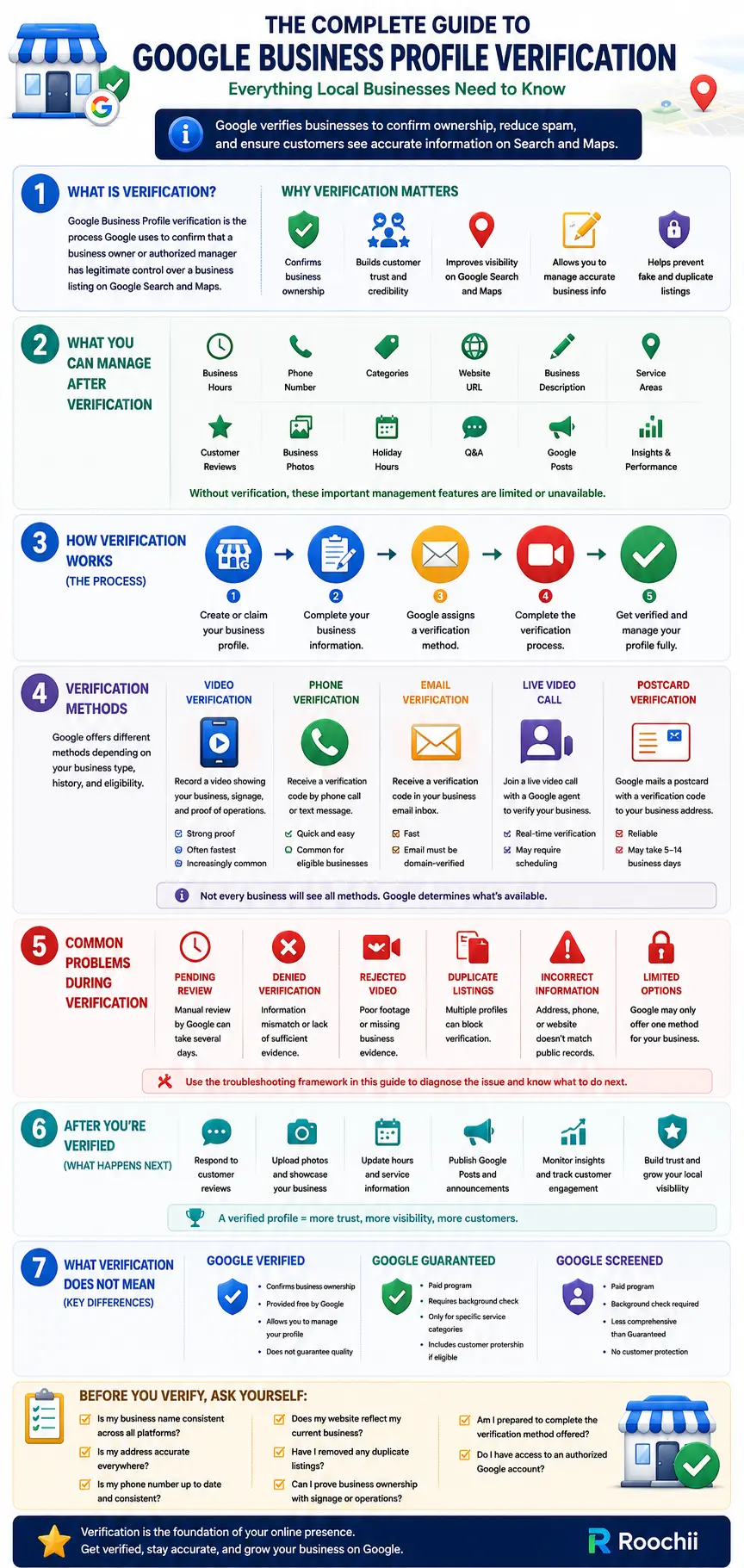
Google Business Profile verification is the process Google uses to confirm that a business owner or authorized manager has legitimate control over a business listing. The listing itself appears on both Google Search and Google Maps, allowing customers to find important information about a company.
Without verification, a business profile exists in a limited state. Business owners cannot fully manage or update the listing until Google confirms ownership.
The process works as a security check that helps Google confirm the profile belongs to a legitimate business operating in a real location or service area.
In simple terms, Google asks for proof before handing over control. Which seems reasonable considering fake listings are still surprisingly common.
Why Google Requires Business Verification
Google handles millions of business listings across different industries. Verification helps maintain the accuracy and reliability of those listings.
There are several reasons why Google requires this process.
Confirm business ownership
Verification confirms that the person requesting access actually owns or manages the business. This prevents unauthorized users from making changes.
Keep listing information accurate
Google wants business information to remain accurate for users searching online. Verified owners can update information whenever changes happen.
This includes:
- Business hours
- Contact numbers
- Physical address
- Service areas
- Website links
Prevent fake or duplicate listings
Fake listings can mislead customers and create confusion. Verification helps reduce fraudulent accounts and duplicate listings.
Improve customer trust
Customers often trust listings that display updated information. Accurate business details help people make faster decisions.
Confirm business authenticity
Verification helps Google confirm that a company genuinely operates where it claims to operate.
Not every listing on the internet deserves blind trust. Google knows that better than most.
What a Google Verified Business Listing Allows You to Manage
After completing verification, business owners gain full access to profile management features.
This gives businesses greater flexibility when managing how customers find and interact with them online.
Verified businesses can manage:
- Business name
- Business hours
- Service categories
- Phone number
- Website URL
- Business description
- Service areas
- Customer reviews
- Business photos
- Holiday hours
- Questions and answers
Owners can also respond directly to customer reviews. This helps maintain customer relationships and address feedback publicly.
Without verification, these management options remain restricted.
How to Verify Your Business on Google
The verification process usually follows a few standard steps. Google may adjust the process depending on business type and account history.
Here is how to verify your business on Google.
Step 1: Create or Claim Your Business Profile
Businesses first need to create a new Google Business Profile or claim an existing listing.
If Google has already created a listing based on public information, owners can request access.
Step 2: Complete Business Information
Provide accurate business details before requesting verification.
This includes:
- Business name
- Address
- Phone number
- Website
- Business category
- Operating hours
Google compares submitted information against existing records.
Step 3: Submit Verification Request
After profile completion, Google presents available verification options.
The available method depends on business type and Google’s internal review process.
Step 4: Complete Google’s Verification Process
Follow the selected verification method and submit all required information.
Once approved, the profile becomes fully manageable.
Are You Ready for Google Business Profile Verification?
Before starting Google Business Profile verification, businesses should make sure their information is accurate and consistent across all public platforms.
| Verification Requirement | Fully Ready | Needs Review | High-Risk Issue | Next Step |
|---|---|---|---|---|
| Business Name Consistency | Matches website and listings | Minor naming variations | Major inconsistencies across platforms | Standardize your business name everywhere first |
| Business Address Accuracy | Address is accurate | Formatting inconsistencies | Wrong or outdated address | Update your address on all business platforms |
| Phone Number Consistency | Phone number is consistent online | Old number still appears | Multiple active phone numbers | Update business citations and directories |
| Website Accuracy | Website reflects current information | Missing business details | No active website or incorrect details | Update website before submitting verification |
| Duplicate Listings Check | No duplicate listing exists | Possible duplicate listing | Multiple active listings found | Remove or merge duplicate listings first |
| Business Category Accuracy | Correct category selected | Category may need adjustment | Incorrect category selected | Review and update category before verification |
| Proof of Business Operations | Supporting proof is available | Limited supporting proof | No visible proof available | Prepare signage, equipment, or supporting materials |
| Google Account Access | Authorized account controls listing | Shared account access | No verified account ownership | Resolve account access before proceeding |
Note: Google Business Profile verification requirements may vary depending on business type, account history, and the verification method Google makes available during the review process.
Google Business Profile Verification Methods
Google offers different verification methods depending on the business.
Verification options vary between businesses. Google determines available methods based on factors such as industry, location, account history, and account risk.
Common methods include:
Video Verification
Business owners record a video showing proof that the business physically exists.
This may include:
- Office signage
- Equipment
- Storefront
- Work vehicles
- Access to business operations
Live Video Call
Google may request a live call with a representative who verifies business legitimacy in real time.
Phone Verification
A verification code is sent through an automated phone call or text message.
Email Verification
Google sends a verification code to an authorized business email address.
Postcard Verification
Google sends a physical postcard containing a verification code to the listed address.
This method used to be common, although Google increasingly relies on faster options.
In recent years, Google has increasingly relied on video verification because it allows the platform to confirm that businesses physically operate where they claim to while reducing fraudulent listings more effectively than older verification methods.
Although methods like phone, email, and postcard verification still exist, video verification has become one of Google’s more common options for businesses that require stronger ownership confirmation.
Verification Methods Comparison Table
Since Google does not offer every verification method to every business, understanding how each option differs can help set expectations during the process.
| Verification Method | Typical Speed | Availability |
|---|---|---|
| Video Verification | 1 to 5 business days | Most common |
| Live Video Call | Varies depending on scheduling | Limited availability |
| Phone Verification | Usually immediate | Limited availability |
| Email Verification | Usually immediate | Limited availability |
| Postcard Verification | Several business days | Less common |
Note: Google does not offer every verification method to every business. Available verification options may change depending on business category, account history, and Google’s verification requirements.
What Happens After Your Google Business Profile Gets Verified
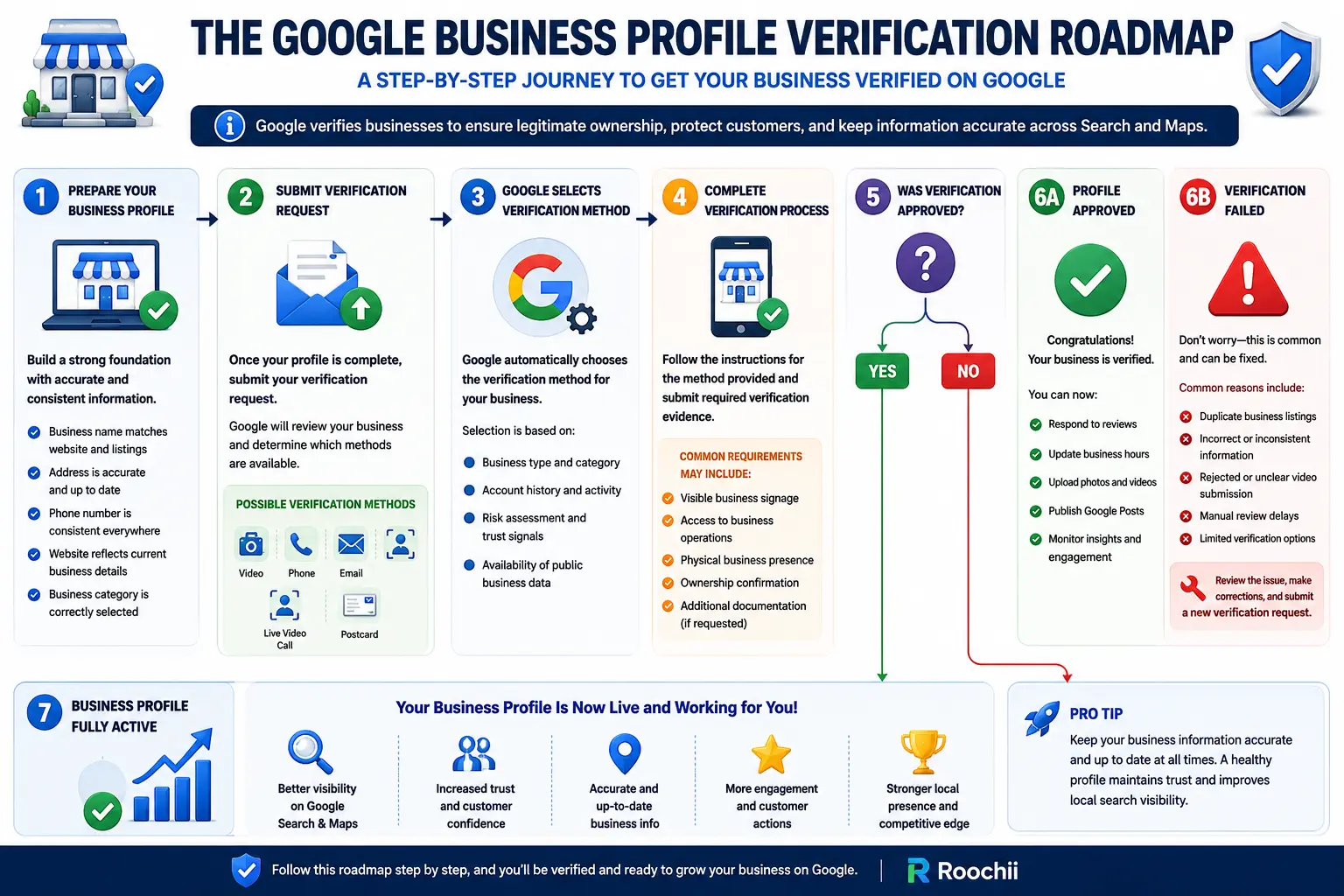
Once Google Business Profile verification is complete, businesses gain full control over how their listing appears across Google Search and Google Maps. This allows owners to manage profile information, interact with customers, and keep business details accurate as operations change.
After verification, businesses can immediately begin managing important profile features, including:
- Updating business hours and contact details
- Responding to customer reviews
- Uploading business photos
- Editing services and business descriptions
- Publishing Google Business Profile posts
- Monitoring customer engagement and profile insights
Keeping the profile updated after verification helps customers find accurate information while giving businesses more control over how they appear in local search results.
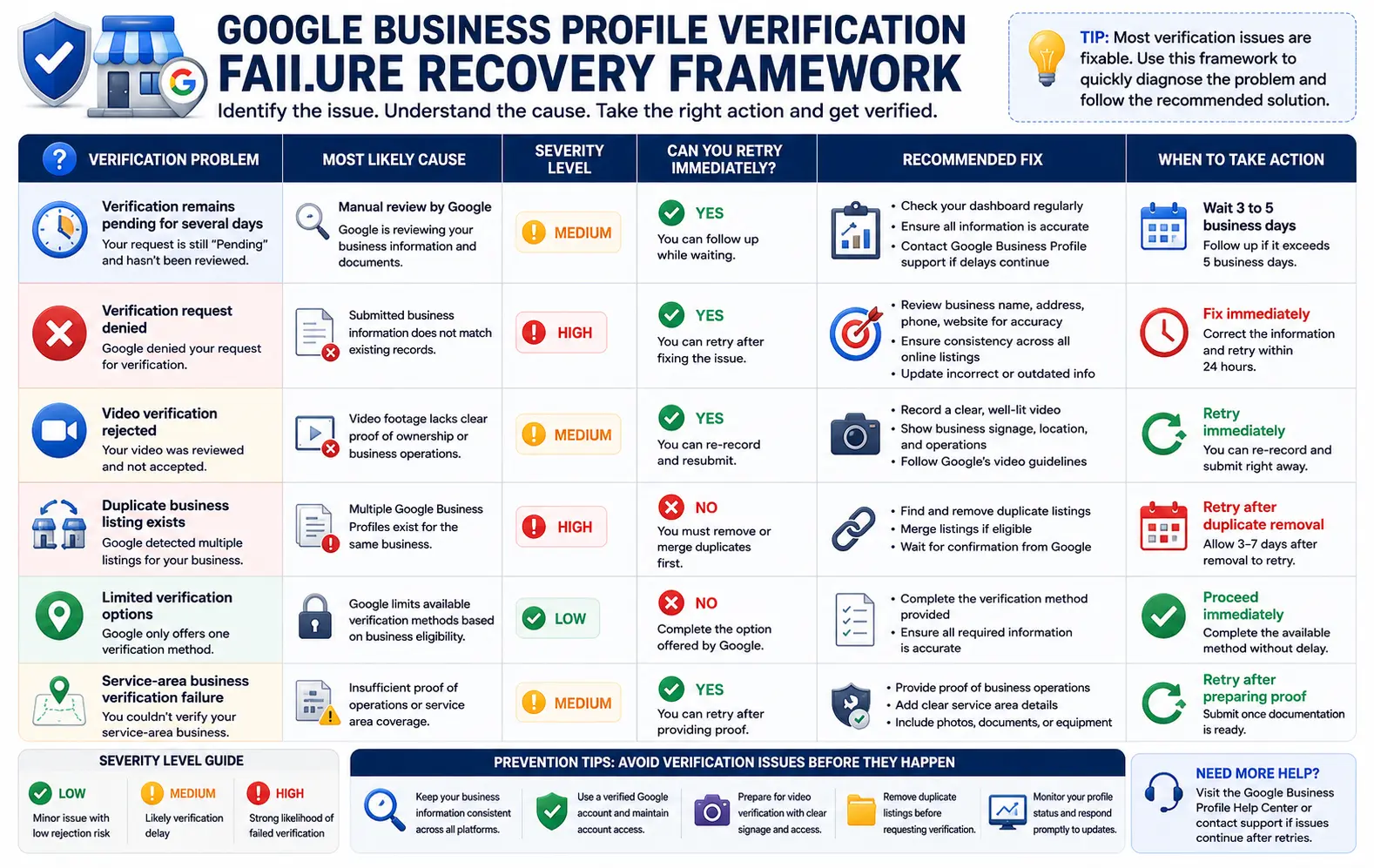
Common Problems During Google Business Profile Verification
Google Business Profile verification does not always go smoothly, especially when submitted business information does not match Google’s requirements.
Several common issues can delay approval or cause rejection, but understanding what causes these problems can make the process easier to resolve.
Verification stuck in pending review
Google sometimes places verification requests under manual review, which may delay approval for several days or weeks. If your request remains pending longer than expected, check your Google Business Profile dashboard for additional instructions or contact support for further review.
Denied verification
Google can reject verification requests if submitted information appears inconsistent. Incorrect business details often cause this issue.
If your request gets denied, review all submitted business information carefully and make sure it matches the details shown on your website, business documents, and other public listings.
Incorrect business information
Differences between your submitted details and publicly available records may trigger verification problems.
Before submitting verification, double-check that your business name, address, phone number, and website information remain consistent across all online platforms connected to your business.
Duplicate listings
Multiple listings for the same business can confuse Google’s verification system. Duplicate profiles should be removed before submitting a request.
If duplicate listings exist, request removal or consolidation first before attempting verification again to avoid unnecessary delays.
Limited verification options
Not every business qualifies for every verification method. Some businesses may only receive one available option.
If Google only offers one verification method, businesses typically need to complete that available option since manual selection is not always possible.
Failed video submission
Video submissions may fail if Google cannot clearly verify ownership. Poor lighting, missing signage, or incomplete footage often cause rejection.
Before resubmitting, make sure the video clearly shows proof of business operations, visible branding, and authorized access to the location or equipment being recorded.
Why Did Your Google Business Profile Verification Fail?
| Problem | Cause | Severity | Retry? | Recommended Fix | Next Action |
|---|---|---|---|---|---|
| Verification Pending | Manual review by Google | Medium | Yes | Check dashboard regularly and contact support if delays continue | Wait 3 to 5 business days |
| Verification Request Denied | Submitted information does not match existing records | High | Yes | Review business details and correct inconsistencies | Fix immediately |
| Video Verification Rejected | Video lacks proof of ownership or business operations | Medium | Yes | Re-record video showing signage, equipment, and business access | Retry immediately |
| Only One Verification Method Available | Google limits available verification options | Low | No | Complete the verification option currently offered | Proceed immediately |
| Duplicate Business Profile Exists | Multiple business listings detected | High | No | Remove or merge duplicate listings first | Retry after duplicate removal |
| Business Information Mismatch | Address, phone number, or website does not match online records | High | Yes | Standardize all public business information | Retry within 24 hours |
| Service-Area Business Verification Failed | Google requires stronger operational proof | Medium | Yes | Prepare business documentation and service-area details | Retry after preparing proof |
Note: Google Business Profile verification methods and review timelines may change depending on business type, account history, and Google’s internal verification process.
Why Verification Matters for Cleaning Companies
Roochii Cleaning’s Denver cleaning team, like many service-area businesses, relies heavily on trust and local visibility when attracting new customers. Customers usually invite these businesses directly into homes or offices.
Customers often look for strong credibility signals before deciding which service provider to contact.
Verification strengthens credibility and gives customers more confidence when evaluating service providers.
Stronger Customer Trust
A verified profile reassures potential customers that the company is real and actively operating.
This matters when customers are allowing service providers into private spaces.
Improved Local Visibility
Verified listings appear properly across Google Search and Google Maps.
This improves local discoverability when customers search for nearby cleaning services.
Business Authenticity
Customers often compare multiple cleaning providers before booking.
A verified listing helps reinforce business credibility during that comparison process.
Better Profile Management
Cleaning companies frequently update service areas, pricing information, and availability.
Verification allows owners to manage these updates whenever necessary.
For service businesses built entirely on reputation, verification adds another layer of confidence.
What Google Business Profile Verification Does Not Mean
Verification helps establish ownership, but many businesses misunderstand what it actually represents.
Here are common misconceptions.
It Is Not a Ranking Guarantee
Verification does not automatically push a business to the top of search results. Local rankings depend on many separate factors.
It Is Not a Quality Endorsement
Google is not certifying service quality by verifying a profile. Verification only confirms ownership legitimacy.
It Is Not Proof of Google Approval
Google does not personally evaluate whether a business offers excellent service before verifying it. The process focuses on ownership verification.
It Is Not the Same as Google Guaranteed
Google Guaranteed is a completely separate program connected to paid advertising and additional screening. The two are not interchangeable.
Google Verified vs Google Guaranteed vs Google Screened
These three terms often cause confusion, but they serve different purposes.
Google Verified confirms that a business owner has legitimate control over their Google Business Profile.
Google Guaranteed is part of Google Local Services Ads and may include reimbursement protection under certain conditions.
Google Screened applies to select professional service industries after additional background checks.
For a deeper breakdown, read our separate guide comparing Google Verified, Google Guaranteed, and Google Screened.
Final Thoughts
Google Business Profile verification is more than a simple account setup step. It confirms ownership, helps customers trust your business, and gives owners control over how their company appears online.
Verified profiles give businesses greater control over customer-facing information while helping maintain an active presence on Google. It also helps businesses maintain accurate visibility online, especially when reputation plays a major role in attracting new customers.
For local businesses that rely on online discovery, verification should happen early in the setup process. Google requires proof of ownership before granting profile access, which helps maintain trust across its business listings.
TL;DR: Google Business Profile verification is the process Google uses to confirm that a business owner has legitimate control over a business listing before managing how it appears on Google Search and Google Maps. Businesses may verify through methods such as video verification, phone, email, live video calls, or postcard verification, depending on what Google makes available. Completing verification allows businesses to update important profile information, respond to reviews, and maintain a more accurate online presence. Since verification issues like duplicate listings, inconsistent business information, or rejected video submissions can delay approval, businesses should prepare carefully before starting the process and understand how to troubleshoot common problems if they occur.
FAQ
Frequently Asked Questions About Google Business Profile Verification
Approval may happen within minutes, though some methods take several business days.
Yes. Businesses without public storefronts can still verify if they serve customers at their locations.
Rejections often happen because of inconsistent business information, duplicate listings, or incomplete verification materials.
Yes, but information should remain accurate and consistent before submitting a verification request.
Sometimes. Significant profile changes may trigger a new verification request.
Google may only offer video verification when it needs stronger proof that a business physically operates where it claims to. This often happens when Google cannot verify enough information through other verification methods.
Not always. Google typically determines which verification options are available based on business type, account history, and its internal review process. Businesses usually need to complete the method currently offered.
Yes. Home-based and service-area businesses can still complete verification if they meet Google’s eligibility requirements. Verification methods may vary depending on how the business operates and the information Google needs to confirm.